
How Robust OTA Updates Work on Raspberry Pi
How the Raspberry Pi tryboot mechanism enables fail-safe A/B system updates with automatic rollback.

- ota
- raspberry pi
- tryboot
- a/b updates
- bootloader
- embedded linux
A Raspberry Pi on your desk is easy to recover: replace the SD card, connect a display, or reinstall the operating system. Once that Pi ships inside a product, recovery becomes much more expensive. An interrupted update or an unbootable kernel may mean a site visit or an RMA.
Package-by-package updates with apt or a similar tool are therefore a poor fit for updating the complete system of an unattended device. They modify the running root filesystem in place, can leave it partially updated, and make it difficult to know, let alone ensure, that every device in a fleet is running exactly the same software. The result is a fleet of devices running slightly different software stacks and configurations, which leads to inconsistent behavior and failures that are difficult to reproduce even at small scale.
Production devices commonly avoid these problems with A/B system updates. Raspberry Pi 4 and newer devices provide a firmware feature called tryboot that makes this approach particularly effective.
This article explains how the mechanism works: how the firmware selects between two systems, how a new version is tried without becoming the default, and why a failed update automatically falls back to the previous version.
A/B System Updates
An A/B system has two complete bootable versions of the operating system. One is active; the other is spare.
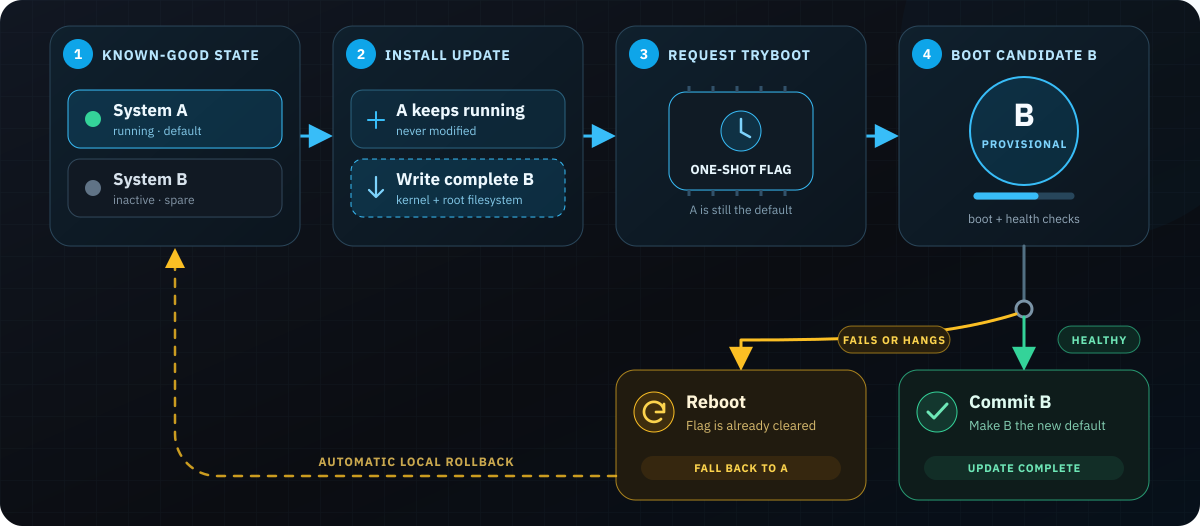
An update is written to the spare version while the active system continues running. Once installation is complete, the device boots the new version provisionally. If it starts successfully and passes its health checks, it becomes the new default. Otherwise, the device reboots into the previous version, which was never modified.
This gives the update an important safety property: losing power while writing the spare does not damage the system that the device normally boots. It also avoids fleet-wide configuration drift because each release is delivered as a complete, tested system artifact rather than assembled package by package on each device.
The cost is additional storage for the second copy of the system. For many embedded products, that is a good trade for predictable updates and local rollback.
How Raspberry Pi Selects a System
On Raspberry Pi 4 and newer devices, the early boot process is controlled by firmware stored in an SPI EEPROM. That firmware reads the boot configuration, loads the kernel and device tree from a FAT boot partition, and starts Linux. The kernel then mounts the root filesystem specified by cmdline.txt.
The firmware’s tryboot mechanism consists of two separate pieces:
autoboot.txtdefines the available boot configurations and the default. Its[all]section contains the default configuration. Its[tryboot]section contains the alternative configuration that can be selected for a try boot.- A one-shot firmware flag selects the alternative configuration for the next boot. An update engine sets this flag through the Raspberry Pi firmware interface before rebooting. The flag is separate from
autoboot.txtand indicates that the firmware should use the[tryboot]option instead of only the default.
For an A/B layout, autoboot.txt might contain:
[all]
tryboot_a_b=1
boot_partition=2

[tryboot]
boot_partition=3
During an ordinary boot, the firmware applies the default configuration in [all], which uses partition 2. When an update engine has separately set the one-shot tryboot flag, that flag selects the alternative configuration. The firmware then also applies [tryboot], whose boot_partition setting overrides the default and uses partition 3.
The tryboot_a_b=1 setting tells the firmware to switch the complete boot partition. Each system can therefore have its own kernel, device tree, configuration, and cmdline.txt, with the command line pointing to the corresponding root filesystem.
This small file defines the two configurations the update mechanism needs:
- The
[all]section defines the committed, known-good default. - The
[tryboot]section defines the alternative option.
The file does not choose between these configurations for a particular boot. The one-shot firmware flag makes that choice by indicating that the alternative should be used on the next reboot.
Why tryboot Provides Automatic Fallback
The crucial property of the tryboot flag is that it is one-shot. It affects the next boot and is then cleared by the firmware.
Assume system A is the current default and an update has been installed as system B:
- The update engine sets the
trybootflag through the firmware interface and reboots. - The firmware sees the flag, applies the
[tryboot]configuration, and boots B. - The flag is consumed, but
autoboot.txtstill names A as the default. - B starts provisionally and performs whatever health checks the product requires.
- If B is healthy, userspace commits it by changing
autoboot.txtso that B becomes the[all]default. - If B fails before that commit, the resulting reboot no longer has a
trybootflag. The firmware follows[all]and boots A again.
The firmware does not decide whether B is healthy, count failed attempts, or mark slots as bad. Its job is narrower: boot the candidate once, then return to the committed default unless userspace explicitly changes that default.
This also explains why a watchdog is important. A kernel panic that reboots the device causes fallback, but a system that simply hangs does not. A hardware watchdog turns that hang into the reboot needed to return to the known-good system.
A Typical Disk Layout
The mechanism requires separate boot and root filesystem storage for A and B. A typical layout contains:
| Area | Purpose |
|---|---|
| Boot configuration | Holds autoboot.txt with the default and alternative options |
| Boot A and B | Kernels, device trees, overlays, and command lines |
| System A and B | The two root filesystems |
| Data | Persistent application data and device state |
Each boot partition points at its matching root filesystem. The shared data partition is intentionally outside the A/B switch so that logs, configuration, and application data survive an update.
Persistent data needs its own compatibility policy. Rolling the operating system back does not automatically roll back a database migration or an incompatible configuration change. Robust system updates therefore need deliberate state management in addition to reliable boot selection.
The exact partition numbers, partition-table format, filesystem sizes, and update-bundle format are implementation choices. They are not part of the tryboot mechanism itself.
What the tryboot Mechanism Does and Does Not Provide
The tryboot mechanism solves the boot-selection part of an OTA design. In particular, it provides a safe way to try a new boot partition once and fall back to the existing default.
A complete update solution must additionally handle:
- building and authenticating reproducible update artifacts;
- installing, validating, and committing candidates while preserving compatible application state; and
- delivering updates through staged rollouts with fleet-wide monitoring and failure handling.
Update authenticity and secure boot are also separate from rollback. Signed update bundles protect the delivery and installation process. Verified or secure boot protects what the device will execute after power-on. Neither follows automatically from using A/B partitions or tryboot.
Supported Raspberry Pi Models
The A/B flow described here targets Raspberry Pi 4 and newer devices. Some devices may require an EEPROM firmware update.
Earlier models can use parts of the tryboot mechanism with sufficiently recent firmware, but their BootROM still requires bootcode.bin on the boot medium. This changes the partition layout and failure model, so they cannot use the same clean A/B boot architecture. Rugix uses U-Boot on those devices.
Which OTA Update Tools Support Raspberry Pi tryboot?
The tryboot primitive must be connected to an update engine that can install both boot and system partitions, set the one-shot flag, identify the running system, and commit a successful update. Support among common Raspberry Pi OTA tools varies:
| Tool | Native tryboot support | Approach |
|---|---|---|
| Rugix Ctrl | Yes | Includes a built-in rpi-tryboot boot flow and matching image layouts. It can be used with different artifact-delivery and fleet-management backends. |
| Raspberry Pi Connect | Yes, cloud-managed | Uses rpi-image-gen to create A/B images with automatic fallback. Device registration and deployment control require the Raspberry Pi Connect backend. |
| RAUC | Custom integration | Does not yet ship a Raspberry Pi firmware backend. Bootlin describes a working integration using RAUC’s custom bootloader backend, while native support remains under development. |
| Mender | No | Mender’s standard Linux rollback integration supports U-Boot and GRUB. Its current Raspberry Pi images use U-Boot rather than tryboot. |
| SWUpdate | Custom integration | Its built-in bootloader interfaces do not include tryboot, but its extensible handler and bootloader interfaces can be used to implement the required behavior. |
Among these standalone update engines, Rugix Ctrl is the only one that currently includes a ready-made tryboot integration. RAUC and SWUpdate provide the extension points needed to build one, but the integrator remains responsible for the Raspberry Pi-specific boot and commit logic.
Several products combine device updates with a fleet-management backend. Raspberry Pi Connect and Mender both take this full-stack approach. The relevant distinction is how tightly the device-side updater is coupled to that backend. Raspberry Pi Connect requires devices to be registered with its service and deployments to be controlled through it, even when update artifacts are hosted elsewhere. Mender’s coupling is looser because it offers a standalone mode and a self-hosted server, although its standard workflow and some features depend on the Mender backend and commercial tiers.
That integration can be convenient, but backend coupling matters for devices expected to remain in service for many years. Replacing the fleet backend should not require replacing the update mechanism on every deployed device. We discuss this trade-off in Avoiding Vendor Lock-In.
For a broader comparison of update strategies, bootloader support, delta updates, security, and backend integration, see our comparison of open-source OTA update engines.
Where Rugix Fits
Rugix implements the image-building and on-device parts of the update system described above. Rugix Bakery and the meta-rugix Yocto layers build images with compatible A/B layouts, while Rugix Ctrl verifies and installs update bundles, requests a tryboot boot, and manages commit and rollback.
A fleet backend is still responsible for delivering those bundles, coordinating staged rollouts, and monitoring the result. Rugix Ctrl can be integrated with different fleet management systems, including Nexigon, the hosted fleet-management platform built by the Rugix team.
That is one implementation of the design, rather than something required by the Raspberry Pi firmware. The central mechanism remains simple: retain a known-good default, write the update somewhere else, try it once, and only change the default after the new system has proved healthy.
Conclusion
The Raspberry Pi’s tryboot feature is a small bootloader primitive with a useful safety property. Because the alternative boot is one-shot, a new system can be tested without immediately replacing the known-good default.
Combined with two bootable system slots, health checks, and a watchdog, this gives Raspberry Pi products the update behavior needed in the field: interrupted installations leave the running system untouched, failed candidates fall back locally, and successful candidates become permanent only after an explicit commit.
At Silitics, we help companies build robust and secure embedded Linux products, including OTA integration, secure boot, and BSP work for Raspberry Pi and other platforms.